



Field Visit



Introduction
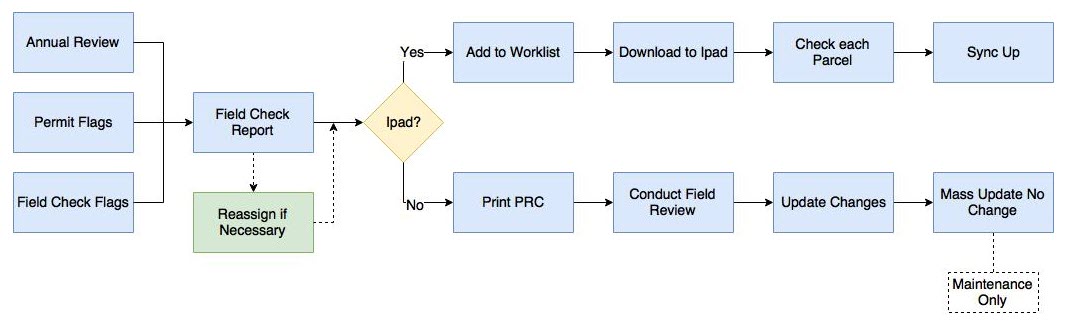
The Field Visit Workflow is a multi-step process in Capture. It starts with assigning neighborhoods a maintenance cycle number. All neighborhoods that need to be maintained in the same year will have the same cycle number. Depending on the cycle number, Capture automatically creates Maintenance flags when the parcels are mass rolled over to the next tax year. However, if the maintenance cycle number is not set up, Maintenance flags can be manually created as shown in the workflow section.
Once the field check flags are created, they can be assigned to different appraisers. The appraisers can load the parcels onto the iPad or mass printed as paper copies. The field appraiser is tasked with obtaining the information from the field and entering it into Capture. If appraiser is using the iPad application then the workflow becomes automatic by simply working from the iPad and synchronizing. If the appraiser is not an iPad user then the work must be manually entered upon returning to the office. At this time, the flags will need to be manually closed and any "No Change" maintenance parcels will need to be mass updated.
Field Visit Workflow

Confidential | Copyright © 2017 E-Ring, Inc.